4.5/5 on Trustpilot 30 days satisfaction guarantee
190+ destinations
NewPOVNOMAD app
190+ destinations
Skip to purchase
English
0
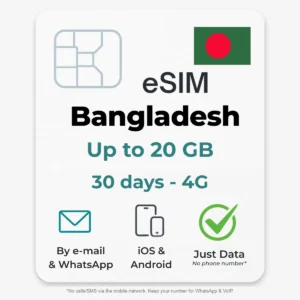
Bangladesh eSIM - 5 GB (30 days) – Travel eSIM by POVNOMAD
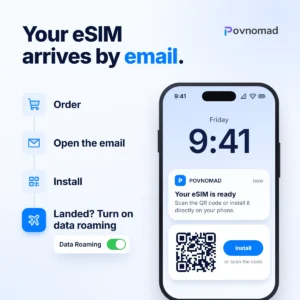
Your eSIM arrives by email.
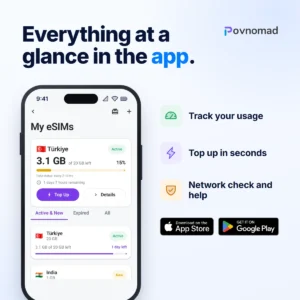
Everything at a glance in the app.
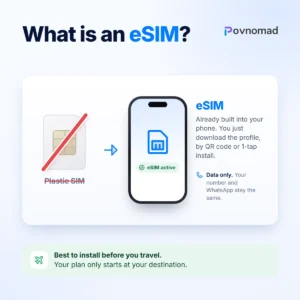
What is an eSIM?
Choose from 190+ destinations.
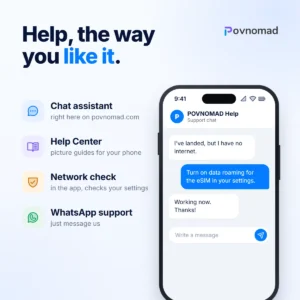
Help, the way you like it.

Bangladesh eSIM

4.5 / 5Trustpilot

4.5 on Trustpilot

39,90 €

Two answers are enough. The result is a guide value.

What do you use the internet for?

or pay directly

Final price. In accordance with Section 19 of the German VAT Act (UStG), no VAT is charged.

Last updated on 2 August 2026

Network & usage

Hotspot
allowed
Phone number
none, data only
Delivery
Email & WhatsApp

Online in 3 steps

  1. Check your deviceDial *#06#. If an EID appears, your phone supports eSIM.
  2. InstallScan the QR code, ideally at home on Wi-Fi.
  3. Switch on at your destinationSelect the eSIM for mobile data and turn on data roaming for the eSIM.

Guarantee and help

30-day satisfaction guarantee. Details in the terms.

Personal help via WhatsApp and email.

Top up the same eSIM, no new QR code needed.

Go to the Help Center →

Also fits your trip

Questions and details

Description

Bangladesh eSIM: mobile internet for your trip

The POVNOMAD Bangladesh eSIM is a data-only plan without a phone number. At your destination it uses the Grameenphone 4G (variable) network. Data plans start at 4,90 € (1 GB, 7 days). You get the QR code by email and can activate the eSIM up to 120 days after purchase. A 30-day satisfaction guarantee applies.

  • 30-day guaranteeNot used? You get your money back. Terms
  • By email & WhatsAppQR code and one-click installation, also on WhatsApp if you add your phone number at checkout
  • Activate within 120 daysThe validity starts only with the first connection at your destination
  • Top-up possibleMore data on the same eSIM, no new QR code

Stay online in Bangladesh anytime – with the digital POVNOMAD eSIM. Simply scan the QR code, activate, and get online on the 4G network right after landing. Perfect for Dhaka, Cox’s Bazar, or trips through rural Bangladesh.

Bangladesh eSIM at a glance

Use in Bangladesh
NetworkGrameenphone 4G (variable)
Data plans1 GB to 20 GB7 to 30 days, from 4,90 €
Top-upYes
Data onlyYes
SMSNo
CallsNoCalls via WhatsApp & co. work
Activate by120 days
Data exitHong Kong (variable)
HotspotYes
ThrottlingNone – the plan ends when the data is used up

As of 2 August 2026. Network operators and data exit are examples and may change at short notice.

Prices & Plans
PlanPrice
1 GB (7 days)4,90€
3 GB (15 days)10,90€
5 GB (30 days)15,90€
10 GB (30 days)26,90€
20 GB (30 days)39,90€

Final prices. No VAT is charged (small business under Section 19 of the German VAT Act, UStG). Delivered by e-mail, usually within minutes and at the latest within 3 working days.

✅ Instructions & activation

Instructions to activate

  1. Buy your eSIM on povnomad.com
  2. You will immediately receive an e-mail with your individual QR code, the quick installation buttons and the instructions
  3. Open your eSIM email and click on the “Android” or “iPhone” button – these are quick installation buttons. Follow the device instructions.
  4. Activate roaming for the eSIM
  1. Alternatively: Open the eSIM function on your smartphone (e.g. under “Mobile network” or “SIM manager”)
  2. Scan the QR code – the eSIM is installed
  3. Select the eSIM as the primary data connection
  4. Activate roaming for the eSIM

Tip: Only install the eSIM shortly before departure or arrival in your destination country so that you are directly connected. An Internet connection is required to download the network details for installation.

📱 Compatible devices

Here’s how to find out if your smartphone supports eSIM:

The easiest way: Check compatibility online (external website) or by entering the code *#06# into the phone’s keypad — Does an EID appear? If so, the smartphone is eSIM-capable.

You can check directly in the settings whether your device is eSIM-enabled:

  • iPhone:
    Settings → Mobile network → Add SIM
    → If “Add eSIM” or “Add mobile tariff” appears → ✅ eSIM possible
  • Samsung / Android:
    Settings → Connections → SIM manager
    → If “eSIM” or “Add mobile tariff via QR code” is displayed → ✅ eSIM-enabled

💡Tip: Not every model has this function – even if the series supports eSIM.

➜ Check device now (compatibility check)

Supported Devices (Selection):

Many modern smartphones support eSIM. Here are some of the most popular and latest models:

  • Apple: iPhone 13, 14, 15 (all variants), SE (2nd gen and newer)
  • Samsung: Galaxy S21, S22, S23, S24, Z Flip 3-5, Z Fold 3-5
  • Google: Pixel 6, 6a, 7, 7a, 8, 8 Pro
  • Huawei: P40, P50 (international models only)
  • Motorola: Razr 2022, Razr 40

❗ Please note: Some models only support eSIM in certain regions or with special firmware.


📶 Network & use

Network & Usage:

Our eSIMs automatically connect to the best available network in the country of travel – e.g. MTN, Vodacom, Claro, Orange, AIS or Telkom.

✅ After purchase, you can see the carriers used in the POVNOMAD app under your eSIM in “Available networks”.
📶 You can check how well the network is developed at your destination here:
➜ Check network coverage worldwide (nPerf)

The network quality depends on the location:

  • ✅ In cities and tourist areas: mostly stable 4G/LTE and often also 5G
  • ❗ In remote regions: limited coverage or lower speed

💡 The eSIM only works in the selected country or region. It cannot be used outside that area. The benefit for you: No extra charges—your eSIM is a prepaid plan, so there’s no risk of roaming charges.

❓ Frequently asked questions (FAQ)

FAQ – Frequently asked questions:

How do I get my eSIM?
Directly by e-mail including QR code and instructions – immediately after purchase.

When does the term of my eSIM begin?
At the first contact with the partner network – not at the time of purchase. You can also install the eSIM directly! The days of validity only begin with the first contact in the host country.

I have installed the eSIM, but no contact with the network?
Normally you don’t have to pay much attention during the installation – we recommend scanning the QR code or using the 1-tap install from your eSIM email or the POVNOMAD app. If the connection does not work immediately, follow our troubleshooting guide (below).

Where can I see the remaining data volume or the remaining term?
In the POVNOMAD app: there you can see the remaining data, remaining validity and the available networks of your eSIM. If you bought your eSIM on the website, add it to the app with the POV code from your eSIM email. Usage data is updated every 2–3 hours.

Is hotspot allowed?
Yes, hotspot is included with all POVNOMAD eSIMs at no extra cost.

Can I top up my data volume or extend the term?
For data plans (GB), yes: you will find “top up eSIM” in your eSIM email, or search for “top up” in the store or top up directly in the POVNOMAD app and book extra gigabytes. Unlimited plans (Smart, L, XL) can currently neither be topped up nor extended – simply order a new eSIM instead.

Is it still not working? Possible sources of error:
– You are not yet in the country / region of the eSIM (e.g. you buy a Turkey eSIM before your vacation, install it on your device – but have no reception? -> Only when you land do you get reception to our partner network, then it works)
– Check whether the following has been activated: 1) Mobile data for the eSIM 2) Data roaming for the eSIM
– Check whether the APN settings have been entered correctly. At the top you will find the APN settings tab (e.g. for Android: here the APN for eSIM Turkey or Georgia must be entered manually – it is “isp”). The POVNOMAD app shows the correct APN for your eSIM.
– Select the network manually:
iPhone: Settings › Mobile Service/Cellular › tap your eSIM › “Network Selection” › “Automatic” off
Samsung: Settings › Connections › “Mobile networks” › “Network operators” › “Select automatically” off
Other Android: Settings › Network & internet › “SIMs” › the eSIM › “Automatically select network” off
Then tap one of the networks shown. Which partner network your eSIM uses is shown in the POVNOMAD app: open your eSIM › “Network” › “Available networks”.

💬 Do you have any other unanswered questions?
➜ Write to us directly on WhatsApp

👉 More questions? Click here for the complete FAQ page

Any questions? You’ll find the answer in the Help Center.
Go to the Help Center

Is my device eSIM-compatible?

Quick test: dial *#06#. If an EID appears, your device supports eSIM. It must also be free of any SIM lock.

0